ERP360 · Built by 360Bit Solutions
One system for the way project firms actually work.
From the first client enquiry to the invoice-ready timesheet. Estimates, projects, drawings, time, leave, HR and payroll, under one login, built for firms that run on projects and hours. And if your firm needs something different, we customize it to fit.
Proof, not a pitch
200+ people log into ERP360 every working day.
ERP360 is the operating system we built for project-driven firms: from the first client enquiry to the invoice-ready timesheet. Estimates, projects, drawings, time, leave and HR, under one login.
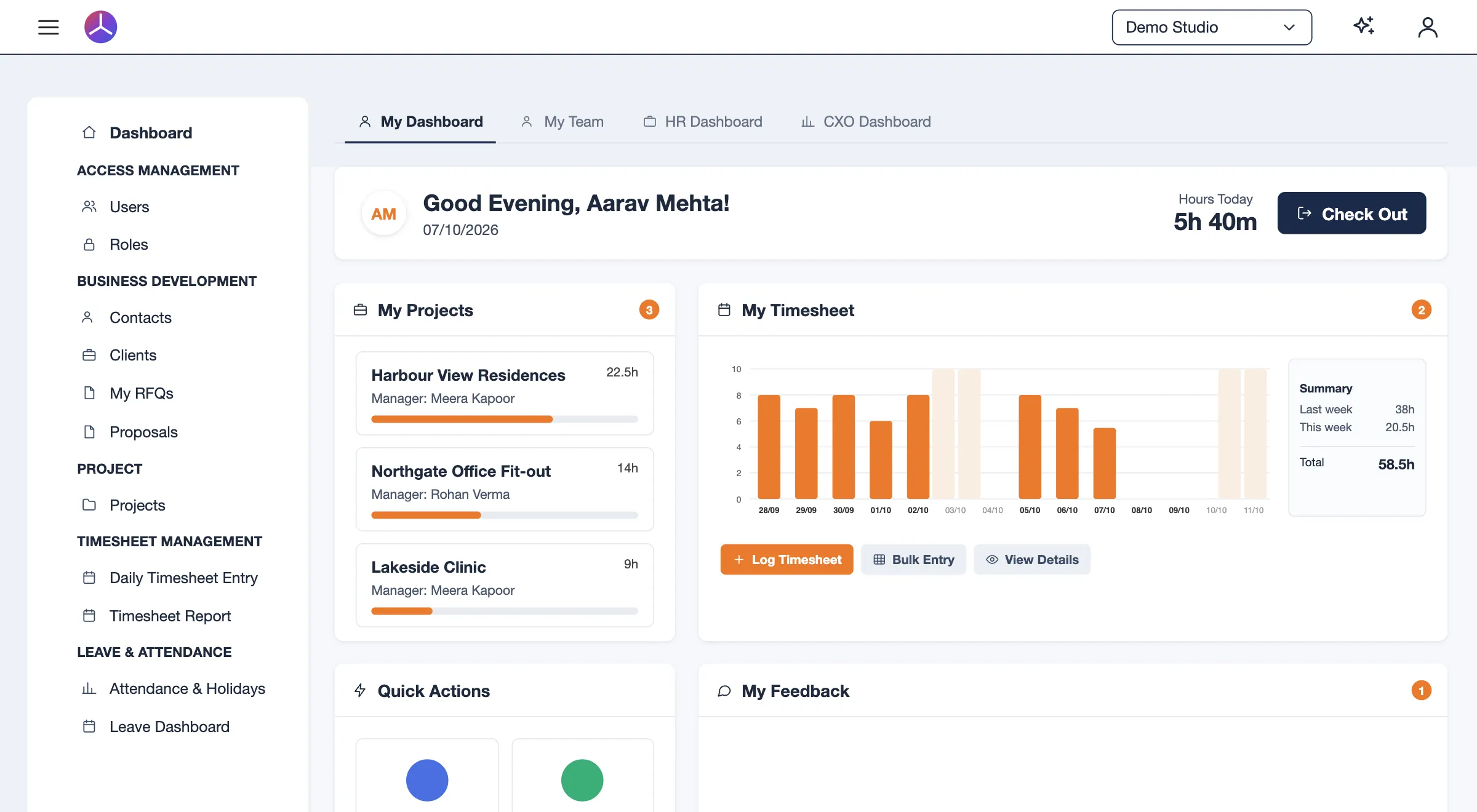
One connected chain, nothing re-typed:
- Enquiry
- RFQ
- Estimate
- Proposal
- Project
- Timesheet
- Planned vs actual, live
Four parts, one login
Built around how a project firm runs.
Each part feeds the next, so an estimate becomes a proposal, a proposal becomes a project, and every hour logged lands against the plan.
Business development
Contacts and clients, RFQs with multi-discipline assignment, discipline-based estimation, and proposals that carry the estimate forward.
Project delivery
Projects, tasks with planned-versus-actual hours, the Drawing Register for sheet-level deliverables, teams and audit trails.
Time and workforce
Timesheets with billable classification and approvals, attendance with location capture, shift rules and late analytics, and a desktop time tracker.
People and HR
Payroll, a leave policy engine, holiday calendars, org chart, employee profiles, recruitment, performance feedback and an internal service desk.
Available today
What's in ERP360.
Everything below is ready to use today, and most of it is already in daily use. Modules marked New are the latest additions.
Across the firm
- DashboardsEmployee, team lead, HR and leadership views, so every role sees its own picture.
- ReportsSeven dedicated reports, exportable.
- Document VaultCentral file storage with folders and sharing.
- Administration and configurationSixteen master-data categories your own team controls.
Business development
- Contacts and clientsOne client record feeding quotes, projects and billing data.
- RFQ and discipline estimationStructured, reusable estimating instead of spreadsheets.
- ProposalsFrom quote to approval to a live project in one step.
Project delivery
- Project managementTasks, stages, team and audit trail, with planned versus actual hours.
- Drawing RegisterSheet-level tracking for drawings and deliverables.
Time and workforce
- TimesheetsDaily and bulk entry, billable split and approvals.
- AttendanceCheck-in and check-out with location, shift rules and late analytics.
- Desktop time trackerNewA desktop app for recording working time.
People and HR
- Leave managementPolicy engine with accruals, carry-forward and approvals.
- Holiday managementHoliday calendars of more than one type.
- HR suitePolicy library, org chart and employee profiles.
- Recruitment and interviewsCandidate pipeline through to hired and onboarded.
- Teams and performance feedbackStructured reviews tied to appraisal cycles.
- OneDesk service deskInternal ticketing with categories and response targets.
- PayrollNewSalary calculation from attendance and leave data, payslips and statutory deductions.
Built around you
Need it to work differently? We'll build it into ERP360.
ERP360 isn't a boxed product you have to bend your firm around. If you want a module to behave differently, or a feature that doesn't exist yet, we build it for you, inside the same system and under the same login. Customization on your request is possible at any level.
Tell us what you needTune a module
Fields, forms, approval steps, roles, reports and dashboards, shaped to how your firm already works.
Extend a module
Need a feature a module doesn’t have? We add it to that module, so it feels native, not bolted on.
Build something new
A whole new module or integration for your workflow, built in the same ERP and sharing the same data.
- Custom workflows
- Extra fields and forms
- Approval chains
- Reports and dashboards
- Integrations with your tools
- Brand-new modules
Desktop time tracker
See where the working day actually goes.
A lightweight desktop app that records working time on its own and feeds it into ERP360. Timesheets get filled in from facts, and managers get a clear picture of productivity without chasing anyone.
Automatic time tracking
Runs quietly in the background. No start and stop buttons to forget.
Productive, unproductive, neutral
Every application and website sits in a category your admins set, so the day reads at a glance.
Time spent on applications
See exactly how long went to each tool and site, by person, team and day.
Auto timesheet log
Tracked time becomes draft timesheet entries against projects. People review and submit instead of reconstructing the week.
Random screenshots
Captured at random intervals and shown on the timeline, for authorised reviewers only.
Day timeline
A minute-by-minute view of the working day, colour-coded by category.
Insights on productivity
Trends for employees, team leads and HR, in the same ERP360 dashboards they already use.
ERP360 implementation
Set up for your firm, by the people who built it.
We set up ERP360 for you in 24 hours. We configure it around how your firm quotes, plans and records time: roles, approval chains, disciplines, leave policies and holiday calendars. Then we move your clients, projects and people across from spreadsheets or a legacy system, train your team, and stay on through adoption.
ERP360 implementation in detailQuestions people ask us first
Can ERP360 be customized for our firm?
Yes, at any level. If you want a module to work differently, a feature it doesn't have, or an entirely new module, we build it into the same ERP on your request. It shares the same login and the same data, so it feels native rather than bolted on.
How long does it take to set up ERP360?
We set up ERP360 for you in 24 hours. You don't install or configure anything yourself: we get it ready, and you can start using it the same day.
Do we get setup and adoption support?
Yes. A dedicated support person works with you through setup and adoption, and stays with your team to make the switch easy, so people actually use the system from the first week.
What does ERP360 cost, and how do we get started?
Pricing is tailored to your firm. Click "Book a demo call" to schedule a 30-minute conversation. We'll understand how you work, show you the parts that matter, and give you a customized price.
How soon will we see something?
We work in short cycles, so you see working software early instead of waiting months for a first look.
What happens after launch?
We stay on: helping your team adopt it and improving it as your business changes.
See ERP360 with your own workflow in mind.
Half an hour. Tell us how your firm runs projects, and we'll show you the parts that matter.